ATS-Friendly Resume Format 2026: Examples, Templates & Mistakes to Avoid
15 Oct 2026 · CTRLin
An ATS-friendly resume can help employers read your qualifications correctly—but good formatting alone will not get you hired. Your resume also needs relevant skills, clear achievements, and information that matches the job you want.
In 2026, many employers use Applicant Tracking Systems (ATS) to manage job applications. These systems help recruiters store, search, organize, and review candidate information. Some also support automated screening or matching features.
This makes resume formatting especially important. A visually impressive resume may look great on your screen but become difficult for certain systems to interpret if it contains complicated layouts, graphics, or text boxes.
The good news? Creating an ATS-friendly resume does not require advanced design skills.
This guide explains the best ATS-friendly resume format for 2026, how to choose a suitable template, where to place important keywords, which formatting mistakes to avoid, and how to check your resume before applying.
What Is an ATS-Friendly Resume?
An ATS-friendly resume is a professional resume designed so applicant tracking software can accurately extract important information such as your name, contact details, work experience, education, and skills.
Instead of relying on elaborate graphics, an ATS-friendly resume uses recognizable headings, readable fonts, and a straightforward structure.
The goal is simple: make your qualifications easy for both recruitment software and hiring managers to understand.
How Does an Applicant Tracking System Work?
An Applicant Tracking System helps employers manage their recruitment process.
Depending on the software and employer's settings, it may:
- Receive and store job applications.
- Extract information from resumes.
- Organize candidate profiles.
- Allow recruiters to search for specific skills or qualifications.
- Support screening questions, workflows, or candidate matching.
- Help hiring teams review and manage applicants.
Not every ATS automatically rejects resumes that lack certain keywords. ATS capabilities and hiring processes vary significantly between employers.
That is why your goal should not be to trick an algorithm. It should be to present your actual qualifications clearly and demonstrate how they meet the job requirements.
What Is the Best ATS-Friendly Resume Format in 2026?
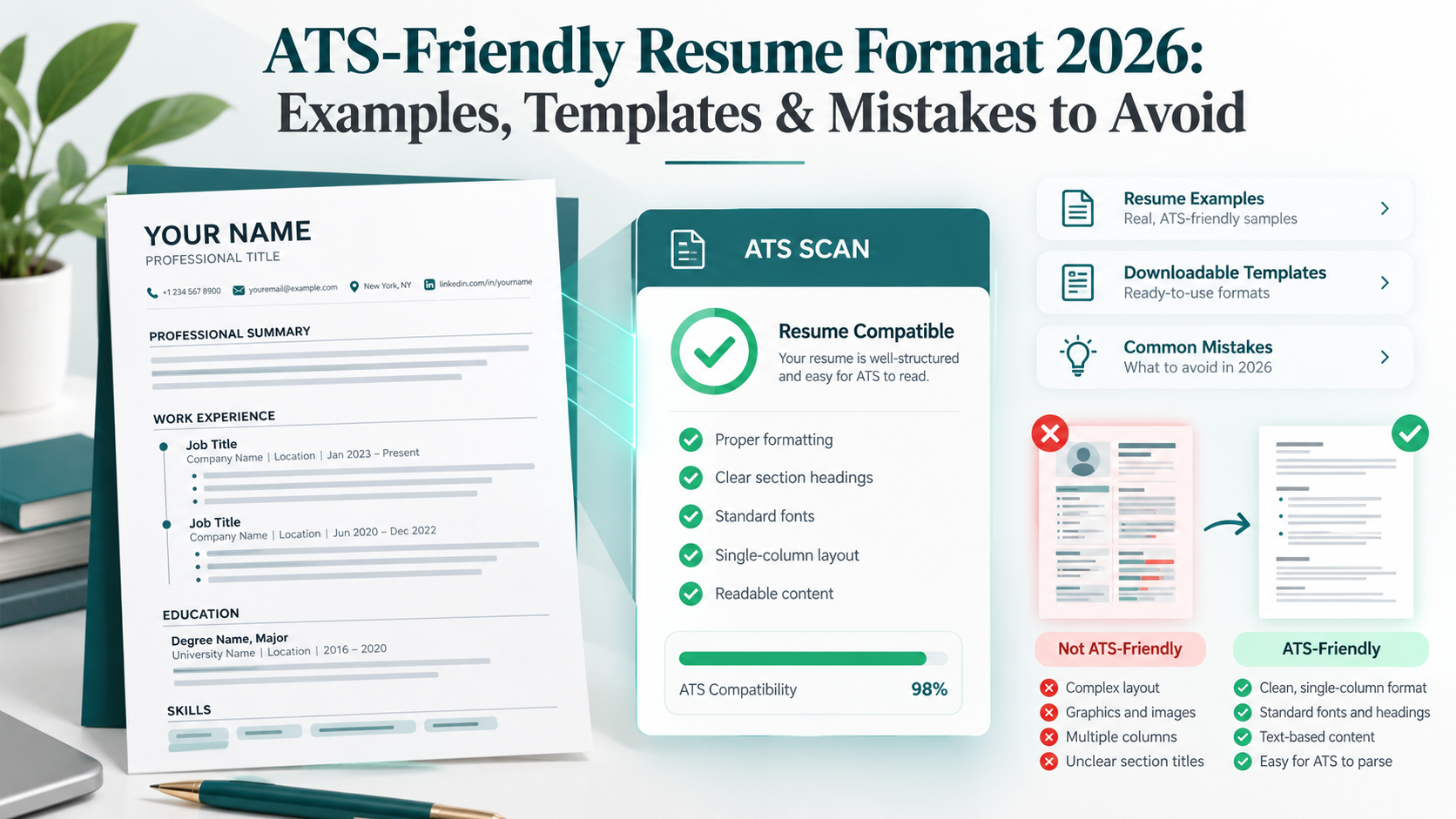
For most job seekers, a reverse-chronological resume with a clean, single-column layout is the safest starting point.
This format places your most recent professional experience first, making your career progression easy to follow.
It also works well with standard resume headings and conventional document structures.
Recommended ATS Resume Formatting
| Resume Element Recommended Format | |
| Layout | Single column |
| Body font | Arial, Calibri, or another readable standard font |
| Font size | Typically 10–12 pt |
| Section headings | Typically 14–16 pt |
| Margins | Approximately 0.5–1 inch |
| Bullet points | Standard bullets |
| Work experience | Reverse chronological |
| Section headings | Work Experience, Education, Skills |
| File format | DOCX or text-based PDF, as requested |
| Length | Usually 1–2 pages, depending on experience |
These are practical recommendations rather than universal technical requirements. Resume readability depends on the software, document structure, and employer's instructions.
Why Is a Single-Column Resume Recommended?
A single-column resume arranges information in a straightforward reading order.
Consider these two layouts:
Complex layout:
A left sidebar contains contact details, skills, and certifications, while a right column contains employment history.
Some document parsers may combine text from these separate areas or extract content in the wrong order.
Simple layout:
Contact Information → Professional Summary → Work Experience → Skills → Education → Certifications.
This linear structure reduces the risk of important information being misplaced during extraction.
Modern ATS software can sometimes interpret more advanced formatting, but a single-column design remains a practical, lower-risk choice.
How to Create an ATS-Friendly Resume: Step-by-Step
Step 1: Choose the Right Resume Structure
Start with a layout that clearly communicates your qualifications.
The most common resume structures are:
Reverse-Chronological Resume
This format highlights your employment history, beginning with your latest role.
Best for:
- Experienced professionals
- Applicants with relevant work experience
- Candidates showing career progression
Functional Resume
This format emphasizes skills rather than detailed employment history.
It can be useful for organizing transferable abilities, but it may make it harder for recruiters to assess where and when skills were developed.
Combination Resume
A combination resume highlights relevant skills and follows them with a chronological employment history.
Best for:
- Career changers
- Professionals with transferable skills
- Candidates with experience across multiple disciplines
For most online applications, a reverse-chronological format is the recommended default.
Step 2: Add Contact Information at the Top
Recruiters should be able to find your contact details immediately.
Include:
- Full name
- Professional email address
- Phone number
- City and country or state
- LinkedIn profile, if relevant
- Portfolio website, if relevant
Example:
Sarah Johnson
Frontend Developer
Austin, TX
LinkedIn: linkedin.com/in/sarahjohnson
Portfolio: sarahjohnson.dev
Avoid putting essential contact information exclusively inside Word's header or footer areas, because some parsers may not extract it reliably.
You usually do not need to include your complete residential address, photograph, marital status, or date of birth unless local requirements specifically call for them.
Step 3: Write a Keyword-Relevant Professional Summary
A professional summary introduces your experience and explains why you are a suitable candidate.
Keep it focused, usually around two to four sentences.
Weak example:
"Hardworking professional seeking an exciting opportunity in a successful company."
This description is generic and does not explain what the applicant offers.
Better example:
"Frontend Developer with 4 years of experience building responsive web applications using React, Next.js, JavaScript, and TypeScript. Experienced in API integration, performance optimization, and accessible user interfaces. Improved application load performance by 28% through component optimization and code splitting."
The example and performance figures above are illustrative.
The second example communicates relevant technologies, experience, and measurable impact.
Tip: Match your professional summary to the job description rather than using the exact same summary for every application.
Step 4: Organize Your Work Experience Clearly
Work experience is one of the most important resume sections.
For each position, include:
- Job title
- Company name
- Location, if relevant
- Employment dates
- Accomplishment-focused bullet points
Example:
Frontend Developer
BrightWave Technologies | January 2023 – Present
- Developed responsive web applications using React, Next.js, and TypeScript.
- Improved page load performance by 28% through code splitting and asset optimization.
- Integrated REST APIs to support real-time product functionality.
- Collaborated with designers and backend engineers to deliver 12 product features.
- Improved accessibility by implementing semantic HTML and keyboard navigation improvements.
Illustrative example; replace all achievements with your own verified experience.
Step 5: Use Achievements Instead of Only Listing Responsibilities
Recruiters need to understand the impact of your work.
Compare these examples:
Weak: Responsible for managing social media accounts.
Better: Managed four social media channels and increased organic engagement by 35% over six months.
A useful bullet-point formula is:
Action Verb + Task or Skill + Result
For example:
"Automated monthly reporting using Excel and Power BI, reducing report preparation time by 40%."
If you do not have numerical results, describe meaningful outcomes without inventing metrics.
Step 6: Include Relevant Skills and Keywords
ATS software can help recruiters search resumes for skills, technologies, certifications, and role-specific qualifications.
Carefully review the job description and identify relevant terms that accurately reflect your background.
For example, a frontend developer job description may mention:
- React
- Next.js
- JavaScript
- TypeScript
- Responsive Design
- REST APIs
- Git
- Accessibility
- Performance Optimization
If you genuinely have these skills, include them naturally in the appropriate sections.
Example Skills Section:
Programming: JavaScript, TypeScript, HTML, CSS
Frameworks: React, Next.js
Tools: Git, GitHub, Figma
Other Skills: REST API Integration, Responsive Design, Web Accessibility
Avoid adding keywords you cannot confidently discuss or demonstrate in an interview.
Step 7: Add Education and Certifications
Use standard section headings and keep qualifications easy to identify.
Example:
Education
Bachelor of Science in Computer Science
University of Texas at Austin | 2021
Certifications
- AWS Certified Cloud Practitioner
- Google Analytics Certification
List only qualifications you have actually earned. Include relevant completion dates when helpful.
Step 8: Save Your Resume in the Correct File Format
Two commonly accepted formats are DOCX and PDF.
DOCX: Often provides straightforward text extraction and is useful when an employer explicitly requests a Word document.
PDF: Preserves the visual layout and can work well when the PDF contains selectable, correctly ordered text.
A PDF is not automatically ATS-unfriendly, and a DOCX file is not automatically ATS-safe.
Always follow the file-format instructions in the job posting.
If no format is specified, choose a clean DOCX or text-based PDF and verify that its content extracts correctly.
Use a professional filename, such as:
Sarah_Johnson_Frontend_Developer_Resume.pdf
Avoid filenames such as resume_final_final2.pdf.
ATS-Friendly Resume Template for 2026
The following template can be adapted for different industries and experience levels.
Template 1: Professional ATS-Friendly Resume
[Your Full Name]
[Target Job Title]
[City, State/Country]
[Email Address] | [Phone Number]
[LinkedIn URL] | [Portfolio URL]
Professional Summary
[Write 2–4 sentences highlighting your experience, relevant technical or professional skills, and strongest achievements.]
Work Experience
[Job Title]
[Company Name] | [Month Year – Present]
- [Action verb] + [relevant responsibility] + [measurable result].
- [Describe another relevant accomplishment].
- [Highlight an important skill used in your work].
[Previous Job Title]
[Company Name] | [Month Year – Month Year]
- [Relevant achievement].
- [Relevant achievement].
Skills
Technical Skills: [Skill 1], [Skill 2], [Skill 3]
Tools: [Tool 1], [Tool 2], [Tool 3]
Additional Skills: [Relevant competencies]
Education
[Degree]
[University Name] | [Graduation Year]
Certifications
[Certification Name] | [Issuing Organization]
Projects (Optional)
[Project Name]
- [Describe the project, technologies used, and measurable outcome where available].
Template tip: Keep this as a single-column document. Do not turn the section headings into floating text boxes or arrange your work history inside a layout table.
ATS-Friendly Resume Examples for Different Career Levels
A good resume should reflect your actual career stage. The same template does not need to contain identical sections for everyone.
Example 1: ATS-Friendly Resume for Freshers
If you have limited professional experience, highlight education, internships, projects, and relevant skills.
Professional Summary Example:
"Recent Computer Science graduate with hands-on experience in JavaScript, React, and web application development through academic projects and internships. Built responsive interfaces and integrated REST APIs. Seeking an entry-level Frontend Developer opportunity."
Recommended Sections:
- Contact Information
- Professional Summary
- Education
- Technical Skills
- Projects
- Internships or Experience
- Certifications
Sample Project:
Task Management Web Application
- Developed a task management application using React and JavaScript.
- Implemented task creation, filtering, and status tracking.
- Used responsive CSS to support desktop and mobile layouts.
Example 2: ATS-Friendly Resume for Experienced Professionals
Experienced professionals should emphasize relevant accomplishments, leadership, and progression.
Professional Summary Example:
"Senior Digital Marketing Specialist with 7 years of experience in SEO strategy, content marketing, and performance analysis. Skilled in Google Analytics, Search Console, keyword research, and conversion optimization. Led cross-functional campaigns and improved organic search performance across multiple business websites."
Recommended Sections:
- Contact Information
- Professional Summary
- Work Experience
- Core Skills
- Education
- Certifications
Prioritize accomplishments from recent, relevant roles rather than listing every task from your career.
Example 3: ATS-Friendly Resume for Career Changers
Career changers can highlight transferable skills while preserving a clear employment history.
Suppose an operations coordinator wants to become a project coordinator.
Professional Summary Example:
"Operations professional with 5 years of experience coordinating schedules, monitoring deadlines, improving workflows, and collaborating with cross-functional teams. Skilled in Excel, reporting, stakeholder communication, and process documentation. Seeking to apply these transferable skills in a project coordination role."
This approach explains the career transition without misrepresenting previous job titles or experience.
How to Optimize Your Resume for ATS Keywords
Correct formatting helps software extract your information. Relevant content helps employers understand your fit for a role.
Both matter.
Identify Keywords in the Job Description
Review the job advertisement and look for:
- Required technical skills
- Software and tools
- Job responsibilities
- Industry terminology
- Certifications
- Education requirements
- Relevant methodologies
Consider this hypothetical job posting:
"We are seeking a Frontend Developer experienced in React, TypeScript, REST APIs, responsive design, and Git."
Relevant keywords may include React, TypeScript, REST APIs, responsive design, and Git.
Use Keywords Naturally
Place relevant keywords in your professional summary, work experience, and skills sections where appropriate.
Poor example:
"React React Developer TypeScript REST APIs Git React Frontend."
Better example:
"Developed responsive React applications using TypeScript, integrated REST APIs, and managed source code using Git."
The improved version gives context and demonstrates actual experience.
Avoid Keyword Stuffing
Repeating the same keyword excessively does not guarantee a better result.
Instead, use the language from the job description when it accurately describes your qualifications.
A resume should remain useful and persuasive when a human reads it.
10 Common ATS Resume Mistakes to Avoid in 2026
Even a qualified candidate can make resume choices that reduce clarity or create avoidable formatting risks.
1. Using Complex Multi-Column Templates
Some resume parsers struggle with content arranged in multiple columns.
Fix: Choose a simple, single-column template for online applications.
2. Putting Information in Text Boxes
Text boxes and decorative elements may cause information to be extracted incorrectly.
Fix: Use regular paragraphs, headings, and bullet points.
3. Using Unusual Section Headings
Creative labels such as "My Career Adventure" or "My Superpowers" may be less clear than conventional resume headings.
Fix: Use familiar headings such as Work Experience, Skills, and Education.
4. Adding Images Instead of Text
A text-based parser may not extract words embedded in images.
Fix: Keep important resume details as selectable text.
5. Using Unreadable Fonts
Decorative fonts can reduce readability and may create extraction issues.
Fix: Use standard professional fonts such as Arial or Calibri.
6. Including Irrelevant Keywords
Adding every keyword from a job posting can make your resume misleading.
Fix: Include only skills and qualifications you genuinely possess.
7. Submitting an Image-Only PDF
A scanned resume may not contain a usable text layer.
Fix: Export a text-based PDF from a word processor or resume builder.
8. Using the Same Resume for Every Application
A generic resume may fail to emphasize the qualifications most relevant to each position.
Fix: Tailor your summary, skills, and achievements to the opportunity.
9. Listing Duties Without Results
A long list of responsibilities tells employers what you were assigned, but not necessarily what you accomplished.
Fix: Highlight contributions, improvements, projects, and relevant outcomes.
10. Forgetting to Check the Final File
A resume may look correct visually but contain extraction errors.
Fix: Test the final file before submitting your application.
How to Check Whether Your Resume Is ATS-Friendly
You do not need to understand how every applicant tracking system works to perform a few useful checks.
Test 1: Copy and Paste Your Resume
Open your final resume, select its text, and paste it into a plain-text editor.
Check whether:
- Your name and contact information appear correctly.
- Section headings remain understandable.
- Work experience appears in the right order.
- Skills and qualifications are present.
- Important details are missing or scrambled.
This is a helpful preliminary test, although it does not replicate every ATS parser.
Test 2: Compare Your Resume With the Job Posting
Review the requirements of your target job.
Ask yourself:
- Have I included my most relevant skills?
- Are the tools and technologies named correctly?
- Does my experience show evidence of the required abilities?
- Have I removed unnecessary information?
- Can a recruiter quickly identify my strongest qualifications?
Test 3: Review the Resume as a Recruiter
Read your resume without looking at the job description.
Within a few seconds, can you identify the candidate's target role, relevant experience, and most important strengths?
If not, improve the structure and wording.
Test 4: Use a Resume Parser or Checker
A resume parsing or analysis tool can reveal formatting issues that are not obvious visually.
However, an ATS checker cannot guarantee how every employer's system will process or rank your application.
Treat checker results as diagnostic feedback, not a guaranteed hiring score.
ATS-Friendly Resume vs Creative Resume: Which Should You Use?
The correct format depends on where and how you are applying.
| Feature ATS-Friendly Resume Creative Resume | ||
| Layout | Clean, structured | Visually expressive |
| Graphics | Minimal | Often prominent |
| Reading order | Usually linear | May use multiple columns |
| Online applications | Lower formatting risk | Depends on layout and system |
| Design-focused portfolios | May feel understated | Can showcase visual ability |
| Main objective | Clear qualifications | Visual communication and branding |
For online job applications, an ATS-friendly resume is a practical default.
For creative roles, consider maintaining a separate portfolio that showcases your design work while keeping your application resume easy to read.
You can use CTRLin to organize your resume information and explore professional resume and portfolio templates.
How to Create a Professional Resume With CTRLin
You do not have to build your resume layout entirely from scratch.
CTRLin's Resume Builder provides a structured workflow to organize your professional details, choose a template, customize the presentation, preview your resume, and download it as a PDF.
Step 1: Create Your Profile
Add relevant work experience, education, skills, certifications, and projects.
Step 2: Choose a Suitable Resume Template
Explore the available Classic, Modern, Minimal, Creative, and Professional template styles.
For ATS-focused applications, favor the simplest layout that maintains a clear reading order.
Step 3: Customize Your Content
Make sure your summary, accomplishments, and skills accurately reflect the role you are applying for.
Step 4: Preview Your Resume
Check spelling, spacing, dates, section order, and the overall presentation.
Step 5: Download and Review
Download your resume and check that the PDF contains selectable text and that its content extracts in the expected order.
Ready to create your next resume?
Explore CTRLin's Resume Builder to organize your career information, compare professional templates, and prepare a resume tailored to your next opportunity.
Remember that choosing a template is only one part of ATS readiness. You should still verify your final exported document before applying.
Frequently Asked Questions About ATS-Friendly Resume Formats
1. What is the best ATS-friendly resume format in 2026?
A clean, single-column, reverse-chronological resume is a strong default for most candidates. Use standard headings, readable fonts, relevant skills, and clearly organized experience.
2. Can ATS read PDF resumes?
Many modern ATS platforms can extract text from properly generated PDFs. However, some documents may create parsing problems, particularly if they contain scanned images or complex layouts. Always follow the employer's requested file format.
3. Is a two-column resume ATS-friendly?
Some ATS systems can process multi-column resumes, but compatibility varies. A single-column design reduces the likelihood of reading-order errors.
4. Which font is best for an ATS-friendly resume?
Arial, Calibri, Georgia, and Times New Roman are common readable choices. Consistent formatting and a sensible font size matter more than selecting one particular typeface.
5. Should an ATS-friendly resume be one page?
Not necessarily. One page is often sufficient for students and early-career applicants. Experienced professionals may need two pages to communicate relevant achievements. Focus on relevance and readability rather than an arbitrary page limit.
6. Can I use an ATS-friendly resume template for free?
Yes. Free or accessible resume-building options and templates are available. CTRLin offers a resume-building workflow and professional templates that you can explore, customize, and preview.
7. Does ATS automatically reject resumes without keywords?
Not every ATS automatically rejects resumes based on missing keywords. Screening depends on the employer's configuration, job requirements, and recruitment process. Relevant keywords improve clarity and searchability, but they do not guarantee an interview.
8. How many keywords should I add to an ATS resume?
There is no universal ideal number. Include the skills, tools, qualifications, and responsibilities most relevant to the job, provided they accurately represent your experience.
9. Should I include a photo on an ATS-friendly resume?
For many US-style professional applications, a photo is unnecessary and generally best omitted. Requirements can vary by country and industry, so follow local conventions and employer instructions.
10. Can I use AI to write my ATS-friendly resume?
AI tools can help brainstorm stronger bullet points, improve clarity, and organize relevant skills. However, all generated content should be fact-checked. Never invent experience, achievements, qualifications, or certifications.
Final ATS Resume Checklist for 2026
Before submitting your resume, make sure you can confidently check the following:
- My resume uses a clear, readable layout.
- My contact information appears in the main document body.
- My sections have recognizable headings.
- My most relevant experience is easy to identify.
- My skills match the job requirements truthfully.
- My work experience includes meaningful achievements.
- My dates and job titles are accurate.
- My document does not rely on graphics to communicate essential information.
- My file follows the employer's requested format.
- I have checked the PDF or DOCX for text-extraction issues.
- My resume is tailored to the specific job.
- I have proofread the final document.
Final Thoughts
The best ATS-friendly resume format for 2026 is not necessarily the most visually complicated or the one containing the most keywords.
It is the format that presents your actual qualifications clearly, preserves a logical reading order, and helps employers understand why you are suitable for the position.
Start with a clean template, highlight relevant accomplishments, include genuine skills from the job description, and review your document before applying.
Most importantly, remember that ATS-friendly formatting improves accessibility and clarity; it does not guarantee selection or an interview.
If you are ready to organize your career information into a professional resume, get started with CTRLin and explore templates that support your next career move.
Get Exclusive Updates & Resume Builder Features
Subscribe to our newsletter and stay ahead with the newest tools, design updates, and job-winning tips.