Resume vs Cover Letter vs Portfolio: Key Differences, Examples & When You Need Each
13 Oct 2026 · CTRLin
When applying for a job, you might spend hours perfecting your resume, writing a cover letter, or building an online portfolio. But do you actually need all three?
Many job seekers struggle to understand the difference between a resume, cover letter, and portfolio. While these documents share a common goal—helping employers understand your qualifications—they serve different purposes in the hiring process.
A resume summarizes your professional background. A cover letter explains why you are interested in a particular opportunity and how your experience matches the employer's needs. A portfolio provides tangible examples of your skills, projects, and accomplishments.
Knowing when and how to use each can help you create a more effective job application without repeating the same information across multiple documents.
In this guide, you will learn:
- The key differences between a resume, cover letter, and portfolio
- What each document should include
- Realistic examples for students, professionals, and career changers
- When employers expect one, two, or all three
- How to connect them into one consistent professional profile
- Common mistakes to avoid when applying for jobs
Whether you are applying for your first internship or planning your next career move, understanding these three career tools is an important step toward presenting your qualifications confidently.
What Is the Difference Between a Resume, Cover Letter, and Portfolio?
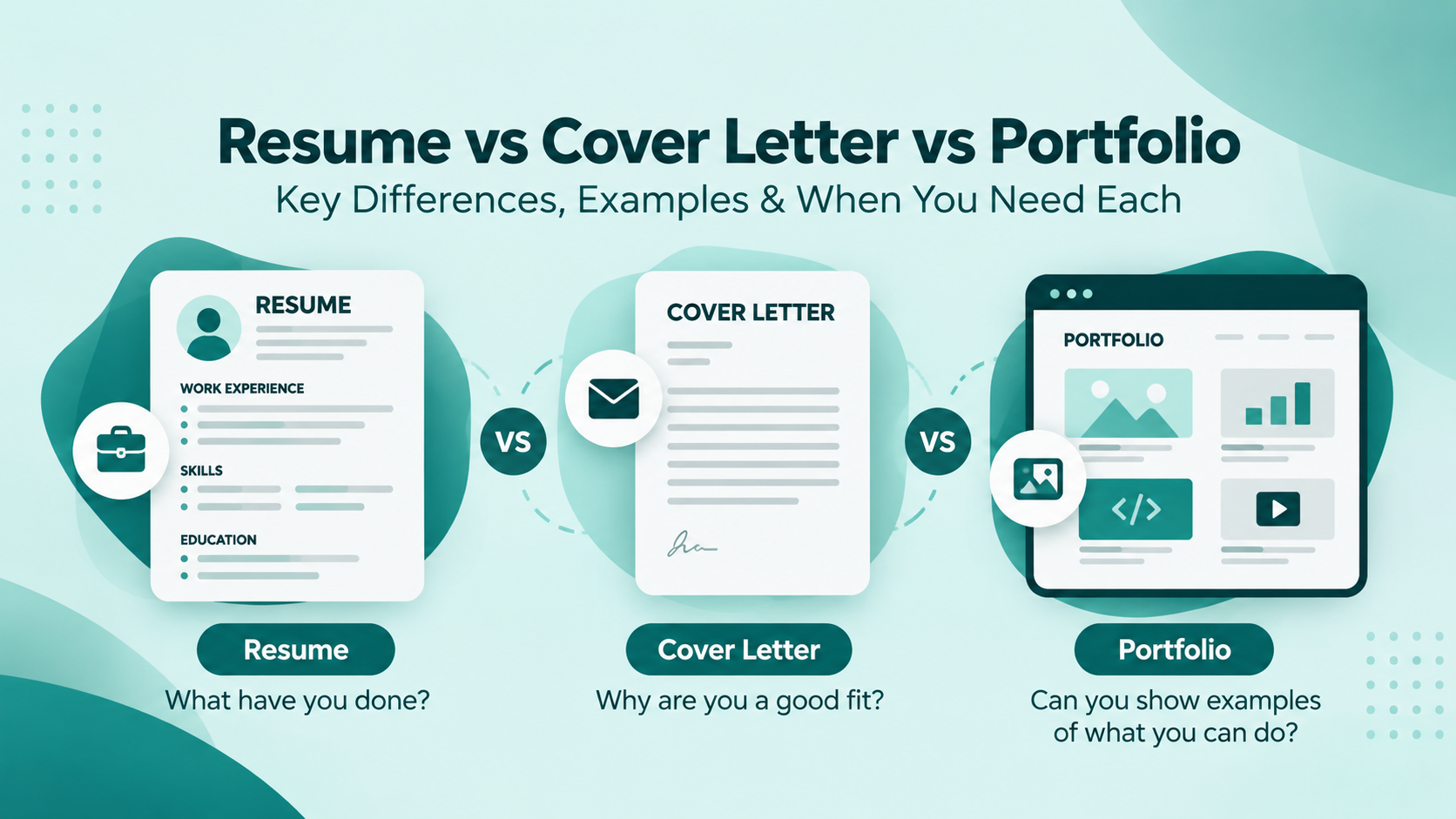
The simplest way to understand their differences is to consider the questions each document answers.
Resume: What have you done?
Cover letter: Why are you a good fit for this particular job?
Portfolio: Can you show examples of what you can do?
Together, they can create a more complete picture of your professional qualifications.
Resume vs Cover Letter vs Portfolio: Comparison Table
| Feature Resume Cover Letter Portfolio | |||
| Main purpose | Summarize qualifications | Explain interest and job fit | Demonstrate skills through work |
| Primary focus | Experience, education, skills, achievements | Motivation, relevant experience, employer needs | Projects, work samples, outcomes |
| Typical length | 1–2 pages for many professionals | Usually one page | Depends on the work and industry |
| Format | Structured document | Professional letter | Website, PDF, or collection of work |
| Customization | Tailored to each role | Highly tailored to each employer | Select projects relevant to the opportunity |
| Common requirement | Required for most job applications | Required, optional, or unnecessary depending on employer | Required in some creative and technical roles |
| Best suited for | Nearly all job seekers | Applicants who need to explain fit or motivation | Professionals whose work can be demonstrated |
| Example | Work experience and quantified achievements | Explanation of relevant projects and interest | Website, app, design, campaign, or case study |
The important takeaway is that these documents complement one another rather than compete.
A strong resume may help an employer quickly identify your qualifications. A thoughtful cover letter can add context. A relevant portfolio can help substantiate your claims through real examples.
However, not every job application requires all three. Always follow the employer's instructions.
What Is a Resume?
A resume is a concise professional document that summarizes your education, work experience, skills, projects, and achievements.
It helps recruiters and hiring managers assess whether your background matches the requirements of an available position.
For many job applications, the resume is the primary document an employer reviews.
What Should a Resume Include?
A well-organized resume commonly includes:
- Contact information: Your name, professional email address, phone number, and relevant profile links.
- Professional summary or objective: A short introduction highlighting your qualifications or career direction.
- Work experience: Relevant jobs, responsibilities, contributions, and achievements.
- Skills: Technical, professional, and transferable skills related to the role.
- Education: Degrees, qualifications, and relevant academic information.
- Projects: Practical work demonstrating relevant skills.
- Certifications: Industry credentials or relevant training, when useful.
Not every candidate needs every section. The strongest resume prioritizes information that matters most to the target employer.
Resume Example for a Frontend Developer
Sarah Ahmed
Frontend Developer | React | JavaScript | Next.js
Professional Summary
Frontend developer with two years of experience building responsive web applications using React, JavaScript, and Next.js. Experienced in reusable UI components, REST API integration, accessibility, and performance optimization.
Technical Skills
- React, Next.js, JavaScript, TypeScript
- HTML5, CSS3, Tailwind CSS
- REST APIs, Git, GitHub
- Responsive design and accessibility
Professional Experience
Frontend Developer — Example Tech Solutions
2024–Present
- Developed responsive dashboard interfaces using React and reusable components.
- Integrated REST APIs to display and update application data.
- Improved interface accessibility through keyboard navigation and semantic HTML.
- Collaborated with designers and backend developers to deliver new features.
Projects
Task Management Dashboard
- Built a task management application with filtering, search, and task-status functionality.
- Created reusable components and connected the interface to backend APIs.
Note: This is a fictional sample for illustration. Replace all details with your actual experience.
When Do You Need a Resume?
A resume is commonly needed when:
- Applying for full-time or part-time jobs
- Seeking internships or graduate opportunities
- Applying for remote positions
- Making a career change
- Attending job fairs
- Sharing your qualifications with recruiters
Even when an employer accepts a LinkedIn profile or portfolio, having an updated resume is useful.
How Long Should a Resume Be?
For many students, fresh graduates, and early-career professionals, one page can be sufficient.
Experienced professionals may need two pages to present relevant achievements clearly.
The ideal length depends on your career stage, industry, country, and the requirements of the position.
The goal is not to make your resume as short as possible. It is to communicate the most relevant information without unnecessary content.
How Can You Create a Professional Resume?
Start by identifying the employer's most important requirements.
Then:
- Choose a clean, readable format.
- Add accurate professional information.
- Highlight relevant skills and experience.
- Explain achievements using specific outcomes.
- Tailor your resume to the position.
- Check spelling, dates, and formatting.
- Follow the application's requested file format.
You can use CTRLin's Resume Builder to organize your professional information and create a resume using customizable templates.
What Is a Cover Letter?
A cover letter is a personalized job application document that explains your interest in a position and connects your qualifications to the employer's needs.
Unlike a resume, which presents structured information, a cover letter allows you to communicate in complete paragraphs and provide meaningful context.
It answers questions such as:
- Why are you interested in this opportunity?
- What makes your experience relevant?
- Which achievements best demonstrate your qualifications?
- What could you contribute to the organization?
A cover letter should not simply repeat your resume.
Instead, it should select the most relevant parts of your professional story and explain why they matter.
What Should a Cover Letter Include?
Most standard job application cover letters contain four sections.
1. Professional greeting
Address the hiring manager by name when you can verify it. Otherwise, use an appropriate greeting such as "Dear Hiring Manager."
2. Introduction
Mention the job title, explain your interest, and briefly introduce your relevant qualifications.
3. Supporting paragraphs
Describe one or two experiences or accomplishments that directly relate to the position.
4. Closing paragraph
Reaffirm your interest, thank the employer, and indicate your willingness to discuss the opportunity further.
Cover Letter Example for a Frontend Developer
Dear Hiring Manager,
I am writing to express my interest in the Frontend Developer position at Example Digital Solutions. With experience developing responsive applications using React, JavaScript, and Next.js, I am excited about the opportunity to contribute to your product development team.
In my previous role, I worked on web-based dashboard applications, developed reusable UI components, and integrated REST APIs to deliver interactive user experiences. These projects strengthened my ability to translate design requirements into functional, accessible interfaces while collaborating with designers and backend developers.
I am particularly interested in this opportunity because of your team's focus on building intuitive digital products. I believe my frontend development experience, attention to interface quality, and collaborative approach would allow me to contribute effectively.
Thank you for considering my application. I would welcome the opportunity to discuss how my skills and experience align with your team's needs.
Sincerely,
Sarah Ahmed
This fictional example demonstrates the format. A real cover letter should reference accurate employer details and the specific job description.
When Should You Use a Cover Letter?
Include a cover letter when:
- The employer specifically requests one.
- The application provides an optional cover-letter field and you can add meaningful information.
- You are making a career change.
- You need to explain how transferable skills match the position.
- Your motivation for a particular organization is important.
- You are applying directly through email and need a professional introduction.
A cover letter may be unnecessary when the employer explicitly states not to include one.
Should a Cover Letter Be Different for Every Job?
Yes, its content should be tailored to the role and employer.
You can reuse a basic structure, but avoid sending the same generic message to every company.
For example, if you apply for a frontend developer role, discuss relevant UI development work.
If you apply for a technical product management position, emphasize product collaboration, requirements analysis, and problem-solving instead.
Both applications may involve the same professional background, but the emphasis should change.
How Can You Create a Cover Letter?
You can use CTRLin's Cover Letter Builder to prepare a professional cover letter using templates and AI-assisted drafting.
Review all AI-generated content carefully. Make sure it accurately represents your achievements, qualifications, and reasons for applying.
A personalized cover letter should sound like you, not like a generic response sent to hundreds of employers.
What Is a Professional Portfolio?
A professional portfolio is a curated collection of projects, work samples, case studies, or achievements that demonstrates your capabilities.
While a resume describes your qualifications, a portfolio allows employers to examine selected examples of your work.
Portfolios are particularly valuable in professions where actual work can provide useful evidence of competence.
Examples include:
- Software development
- UI/UX design
- Graphic design
- Content writing
- Digital marketing
- Photography
- Architecture
- Data analytics
- Product design
- Freelance services
However, portfolios are not limited to creative careers. Teachers, researchers, consultants, and other professionals may also benefit from organizing relevant work samples.
What Should a Professional Portfolio Include?
A useful portfolio typically contains:
Professional introduction
Introduce yourself, your specialization, and the type of work you do.
Selected projects
Include projects that best demonstrate your relevant capabilities.
Project descriptions
Explain the problem, your contribution, the tools or methods used, and the final outcome.
Evidence of work
Use screenshots, live links, writing samples, design files, presentations, reports, or other appropriate materials.
Results and achievements
Where possible, show measurable outcomes, feedback, or improvements.
Contact information
Provide an easy way for interested employers or potential clients to reach you.
Portfolio Example for a Frontend Developer
Sarah Ahmed — Frontend Developer Portfolio
About Me
I am a frontend developer specializing in responsive, accessible, and user-friendly web applications built with React and Next.js.
Featured Project 1: E-Commerce Website
Project overview: Developed a responsive e-commerce interface that allows customers to browse products, search listings, and manage a shopping cart.
Technologies: React, Next.js, Tailwind CSS
My contributions:
- Developed product listing and product details pages.
- Created reusable UI components.
- Implemented responsive layouts.
- Integrated product data through APIs.
Evidence: Website screenshots, live demonstration, and code repository.
Featured Project 2: Analytics Dashboard
Project overview: Built a dashboard that presents key performance indicators through interactive charts and data tables.
Technologies: React, JavaScript, REST APIs
My contributions:
- Designed reusable dashboard components.
- Implemented API-based data rendering.
- Added filters and loading states.
- Improved layout usability across screen sizes.
Evidence: Dashboard screenshots, technical notes, and source code.
These are fictional examples showing how to structure portfolio case studies.
When Do You Need a Portfolio?
A portfolio may be particularly useful when:
- The employer requests project samples.
- Your profession involves visual or technical output.
- You have strong projects but limited formal work experience.
- You are a freelancer seeking clients.
- You are switching into a field where you have developed practical skills.
- You want to demonstrate capabilities that are difficult to explain in a resume.
For example, a student applying for a frontend development internship might have no formal employment history but several strong web development projects.
A portfolio can help demonstrate those skills.
Do You Need a Portfolio If You Already Have a Resume?
Not always.
For some roles, a resume provides enough information for the initial application.
For others, a portfolio adds important context.
Consider a UI/UX designer applying for a product design role. A resume may list skills such as Figma, wireframing, prototyping, and usability testing.
A portfolio can show actual design decisions, research processes, prototypes, and outcomes.
That difference is valuable when employers need to evaluate practical work.
How Can You Build an Online Portfolio?
Start by selecting three to five strong projects, rather than including everything you have ever created.
For each project, explain:
- The problem or objective
- Your specific role
- The tools and methods used
- The process or key decisions
- The final deliverable
- The results or lessons learned
Use CTRLin's Portfolio Builder to create a professional portfolio that presents your projects, case studies, and accomplishments in an organized format.
Resume vs Cover Letter: What Is the Main Difference?
The central difference between a resume and a cover letter is how they communicate your qualifications.
A resume provides concise evidence.
A cover letter explains the relevance of selected evidence to a particular employer.
Example
Resume statement:
"Developed reusable React components and integrated REST APIs for an internal analytics dashboard."
Cover letter statement:
"My experience building reusable React components and integrating REST APIs has prepared me to contribute to your team's dashboard development projects. I enjoy creating interfaces that make complex information easier for users to understand."
Both statements describe related experience, but they perform different functions.
The resume identifies the work.
The cover letter explains how that work connects to the opportunity.
Resume vs Portfolio: What Is the Main Difference?
A resume summarizes your experience, qualifications, and achievements.
A portfolio provides detailed evidence of selected work.
Example
Imagine you are applying for a graphic designer position.
On your resume:
"Developed visual branding materials for three small business projects."
In your portfolio:
You could include:
- Brand identity concepts
- Logo development sketches
- Color and typography decisions
- Final brand assets
- Packaging or website mockups
- An explanation of the design process
The resume communicates the achievement quickly.
The portfolio helps the employer evaluate the actual work behind it.
Cover Letter vs Portfolio: What Is the Main Difference?
A cover letter focuses on your motivation, relevant qualifications, and fit for a position.
A portfolio focuses on demonstrating your abilities through work samples.
Example
A digital marketer applying for a campaign management role might explain in a cover letter how they approach audience research and campaign planning.
Their portfolio could include an actual campaign case study showing the strategy, creative materials, channels, and measurable results.
The cover letter explains the professional connection.
The portfolio demonstrates the work.
Do You Need a Resume, Cover Letter, and Portfolio for Every Job?
No. The documents you need depend on the role, industry, employer requirements, and your experience.
Use the following table as a practical guide.
| Job or Career Situation Resume Cover Letter Portfolio | |||
| Software Developer | Usually needed | If requested or useful | Often valuable |
| UI/UX Designer | Usually needed | If requested or useful | Often expected |
| Graphic Designer | Usually needed | If requested or useful | Often expected |
| Digital Marketer | Usually needed | If requested or useful | Useful for campaign evidence |
| Accountant | Usually needed | Depends on employer | Generally optional |
| Customer Support Representative | Usually needed | Depends on employer | Generally optional |
| Content Writer | Usually needed | Depends on employer | Writing samples often valuable |
| Fresh Graduate | Usually needed | Useful in many applications | Helpful when projects are relevant |
| Career Changer | Usually needed | Particularly useful for context | Helpful for demonstrating new skills |
| Freelancer | Useful | Depends on client | Frequently valuable |
These recommendations are general guidelines, not universal hiring requirements.
Always follow the specific application instructions provided by the employer.
How to Use All Three Together: A Complete Job Application Example
Imagine a candidate named Sarah applying for a frontend developer position.
The employer wants someone experienced with React, responsive design, and API integration.
Sarah can use her resume, cover letter, and portfolio together without repeating the same content.
Step 1: Use the Resume to Establish Qualifications
Her resume includes:
Frontend Developer — Example Tech Solutions
- Developed React-based user interfaces.
- Integrated REST APIs into dashboard applications.
- Built reusable components and responsive layouts.
- Collaborated with designers and backend developers.
The recruiter can quickly understand her relevant experience.
Step 2: Use the Cover Letter to Explain Job Fit
Sarah explains how her experience connects to the employer's needs.
For example:
"My recent work developing React dashboards and integrating backend services aligns closely with your team's focus on interactive web applications. I would welcome the opportunity to bring that experience to your frontend development projects."
She communicates why her background matters to that specific employer.
Step 3: Use the Portfolio to Demonstrate Skills
Sarah links to relevant projects containing:
- Live application demos
- Screenshots
- GitHub repositories
- Case studies
- Technical explanations
- Details of her individual contributions
The portfolio allows reviewers to explore selected examples of the work described in her resume.
Step 4: Keep Information Consistent
Before applying, Sarah checks that:
- Her name and contact information match.
- Her job titles and employment dates are consistent.
- Her portfolio projects support the claims in her resume.
- Her cover letter references accurate accomplishments.
- Every relevant link works.
This creates a connected professional presentation.
The three assets now answer different questions without contradicting one another.
How Fresh Graduates Can Use a Resume, Cover Letter, and Portfolio
If you are a student or recent graduate, you may worry that you do not have enough professional experience.
However, academic projects, internships, volunteer work, competitions, and independent learning can provide useful evidence of relevant skills.
Resume Example for a Student
Education: BS Computer Science
Technical Skills: HTML, CSS, JavaScript, React
Academic Projects:
- Built a student attendance management application.
- Developed a responsive personal website.
- Created a weather application using an external API.
Cover Letter Approach
Explain why the opportunity interests you and how your academic experience has prepared you for it.
For example:
"During my computer science studies, I developed several frontend projects that strengthened my understanding of JavaScript, React, and responsive design. I am excited to apply these skills in a collaborative professional environment."
Portfolio Approach
Provide links to your most relevant projects.
For each project, describe the challenge, your individual contribution, and what you learned.
Avoid presenting academic or personal projects as paid employment. Clear labeling builds credibility.
How Career Changers Can Use All Three Documents
Career changes often involve a challenge: your previous job title may not immediately reflect the skills required for your desired new role.
This is where the three documents can support one another.
Consider a customer service professional transitioning into UX design.
Resume: Highlight transferable experience such as customer research, problem-solving, communication, and relevant UX training.
Cover letter: Explain why you are moving into UX design and how your previous experience informs your approach to understanding users.
Portfolio: Present UX case studies, prototypes, research exercises, and design projects that demonstrate practical skills.
Each component fills a different information gap.
The resume establishes your background.
The cover letter explains your transition.
The portfolio demonstrates your developing capabilities.
How to Create a Consistent Resume, Cover Letter, and Portfolio With CTRLin
Managing multiple application documents can become difficult, especially when your skills, projects, and experience change over time.
Information may become inconsistent if you maintain separate files without updating them regularly.
For example, your resume might show your current position while your portfolio still displays an outdated job title.
CTRLin helps organize resume, portfolio, and cover-letter creation around a professional profile.
1. Build Your Professional Profile
Start by adding accurate information about your education, experience, skills, certifications, and relevant projects.
2. Create Your Resume
Use CTRLin's resume templates to present your qualifications clearly.
Emphasize experience and skills that align with your target position.
Create Your Resume with CTRLin
3. Build Your Professional Portfolio
Choose relevant projects and prepare clear explanations of your contributions and outcomes.
A strong portfolio should demonstrate the quality of your work, not simply display a large number of projects.
Build Your Portfolio with CTRLin
4. Prepare Your Cover Letter
Use a suitable cover-letter template and adapt the content to the employer and job description.
Make sure the final letter accurately reflects your background and communicates meaningful reasons for your interest.
Create Your Cover Letter with CTRLin
5. Review Your Complete Application
Before submitting, check that the three documents communicate a consistent professional identity while serving their different purposes.
Common Mistakes to Avoid
Even experienced job seekers can weaken their applications by using these documents incorrectly.
1. Repeating Your Resume in Your Cover Letter
Your cover letter should add context rather than turn your resume bullets into paragraphs.
Focus on one or two relevant achievements and explain their importance.
2. Including Too Many Portfolio Projects
A portfolio containing dozens of incomplete or unrelated projects can make your strongest work difficult to find.
Prioritize relevance and quality.
3. Using the Same Resume for Every Position
Different roles emphasize different qualifications.
Tailor your resume to match the employer's genuine requirements without exaggerating your experience.
4. Creating a Portfolio Without Context
A screenshot alone may not explain what you contributed.
Include project objectives, responsibilities, methods, and outcomes.
5. Making Unsupported Claims
Avoid describing yourself as an expert or claiming numerical improvements unless you have appropriate evidence.
Specific, accurate contributions are more persuasive than exaggerated statements.
6. Ignoring Application Instructions
If an employer requests a specific document, file format, or portfolio link, follow those instructions.
Do not assume every application requires exactly the same materials.
7. Using Inconsistent Professional Information
Different job titles, conflicting dates, incorrect links, or mismatched achievements can create confusion.
Review all documents together before applying.
8. Relying Entirely on AI-Generated Content
AI writing tools can help you draft and improve application materials, but they cannot verify your professional history automatically.
Always review generated text, remove invented details, and personalize the final result.
Final Checklist Before Submitting Your Job Application
Resume Checklist
- Contact information is accurate.
- Resume is tailored to the role.
- Relevant skills and experience are easy to find.
- Achievements are specific and truthful.
- Formatting is readable.
- File format follows employer instructions.
Cover Letter Checklist
- Correct job title and organization.
- Clear explanation of relevant qualifications.
- Specific reason for applying.
- No unnecessary repetition of the resume.
- Professional tone and accurate details.
- No spelling or grammar errors.
Portfolio Checklist
- Best and most relevant projects are featured.
- Each project identifies your actual contribution.
- Projects include useful evidence or work samples.
- Portfolio is easy to navigate.
- Links work correctly.
- No confidential client or employer information is exposed without permission.
Frequently Asked Questions
1. Is a resume the same as a cover letter?
No. A resume summarizes your qualifications, skills, education, and experience. A cover letter explains why your qualifications make you suitable for a specific position and why you are interested in that opportunity.
2. Is a portfolio the same as a resume?
No. A resume provides a concise overview of your professional background. A portfolio presents selected examples of your work to demonstrate relevant skills and accomplishments.
3. Do I need a cover letter if I already have a resume?
It depends on the employer. Include a cover letter when required, and consider adding one when it is optional and allows you to explain something useful. Do not include one when the employer explicitly says not to.
4. Can a portfolio replace a resume?
Sometimes an employer may accept a portfolio or online profile instead of a resume, but many standard job applications still require a resume. A portfolio should not automatically be treated as a substitute unless the application instructions allow it.
5. Should students create a portfolio without work experience?
Students can benefit from a portfolio when they have relevant academic, personal, volunteer, or independent projects. A useful portfolio demonstrates what they can do even if they have not yet held a formal job.
6. Which is more important: a resume or a portfolio?
It depends on the job. A resume is important for most traditional job applications. A portfolio may be especially important in roles where employers need to assess creative, technical, or project-based work.
7. How many projects should I include in my portfolio?
Three to five strong, relevant projects can be a practical starting point, but there is no universal rule. Include enough work to demonstrate your capabilities without overwhelming the reader.
8. Should I include my portfolio link in my resume?
Yes, when the portfolio is relevant to the position. Place a working portfolio link in your contact section or another appropriate location so employers can access your work easily.
9. Can I use the same portfolio for multiple job applications?
You can maintain one main portfolio, but consider featuring different projects for different roles. A frontend developer role and a UI/UX design role may require different evidence.
10. Can I create a resume, cover letter, and portfolio using one platform?
Yes. CTRLin provides resume, cover-letter, and portfolio-building tools connected through a professional profile, helping users create and maintain their career materials in one place.
Conclusion: Resume, Cover Letter, or Portfolio Which Do You Really Need?
Understanding the difference between a resume, cover letter, and portfolio helps you choose the right materials for each job opportunity.
A resume communicates your qualifications and professional history.
A cover letter explains your motivation and connects your experience to the employer's needs.
A portfolio demonstrates your skills through selected examples of actual work.
You do not need all three for every job. However, when used appropriately, they can strengthen one another and give employers a clearer understanding of your qualifications.
The strongest job applications do not simply contain more documents. They provide the right information, in the right format, for the right opportunity.
Ready to organize your professional story?
Build a resume that highlights your strengths, create a cover letter tailored to your next opportunity, and showcase your work through a professional portfolio.
Get Started with CTRLin — Create the career materials you need, all in one place.
Get Exclusive Updates & Resume Builder Features
Subscribe to our newsletter and stay ahead with the newest tools, design updates, and job-winning tips.